
Thank you for using Bloguru.
We are pleased to announce that we have released the link insertion/edition tool in addition to the text style feature we released a while ago.
Now you will be able to add links just by following the simple steps as below:
1. Enter the text in the content editor (ex. PSPINC)
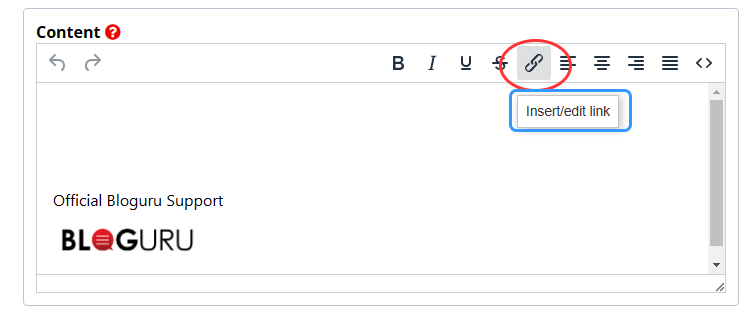
2. Select the text you would like to inser the URL, click 'Insert/edit link' button as shown above
3. Enter the URL address
You can also select to open the link in a new tab by choosing 'New window' option.
Please give it a try and let us know if you got any feedback. As always, we appreciate your continued support for Bloguru!
Official Bloguru Support

We are pleased to announce that we have released the link insertion/edition tool in addition to the text style feature we released a while ago.
Now you will be able to add links just by following the simple steps as below:
1. Enter the text in the content editor (ex. PSPINC)
2. Select the text you would like to inser the URL, click 'Insert/edit link' button as shown above
3. Enter the URL address
You can also select to open the link in a new tab by choosing 'New window' option.
Please give it a try and let us know if you got any feedback. As always, we appreciate your continued support for Bloguru!
Official Bloguru Support