

Thank you for using Bloguru.
We’re excited to announce we’ve added a new feature that will let you easily select the thumbnail image for the video in your posts.
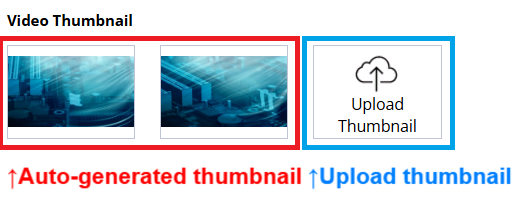
You can either select the auto-generated thumbnail images or upload your own image as the video thumbnail by following the stpes below.
1. Make a post with video upload and save
2. Edit the saved post
* Video thumbnail feature is only avaliable for editing a saved post
3. Scroll down to video thumbnail section
4. Select the auto-generated thumbnail or upload your own thumbnail image
* Supported image upload requirments:
- Filetype: jpg, gif, bmp, png
- Size: Up to 1MB
- Image Dimension: Larger than 200px * 200px (Recommended 1200px * 630px)
5. Save the post
If you have any questions, don’t hesitate to contact Bloguru Support.
Official Bloguru Support

We’re excited to announce we’ve added a new feature that will let you easily select the thumbnail image for the video in your posts.
You can either select the auto-generated thumbnail images or upload your own image as the video thumbnail by following the stpes below.
1. Make a post with video upload and save
2. Edit the saved post
* Video thumbnail feature is only avaliable for editing a saved post
3. Scroll down to video thumbnail section
4. Select the auto-generated thumbnail or upload your own thumbnail image
* Supported image upload requirments:
- Filetype: jpg, gif, bmp, png
- Size: Up to 1MB
- Image Dimension: Larger than 200px * 200px (Recommended 1200px * 630px)
5. Save the post
If you have any questions, don’t hesitate to contact Bloguru Support.
Official Bloguru Support